

Invoice exception tracker
Aging, disputes, follow-ups, owner review.
- Records
- Invoices
- View
- Aging
- Gate
- Approve
tables / dashboard / approval flow
An agent harness for business processes
ExploreDescribe the process in plain language. Proto turns it into working apps, workflows, reports, and connected actions—then keeps every result visible for your review and approval.
Local-first desktop runtime
Cloud or compatible local models
Approval for sensitive actions
Skills and plugins you can inspect
A suggestion is not an app. A chat transcript is not a workflow. If you cannot see what changed, where approval is needed, or what happens next, the work is still yours.
Proto brings the agent, the work, and the outcome into one console. Follow the plan, inspect every result, approve sensitive actions, and keep a durable record of the session.
Ask in ordinary business language, or start from a department agent or skill.
Proto finds the right actions, asks focused questions, and shows progress as it works.
Sensitive actions can pause with a plain-language explanation and reversibility status.
Resume the session, inspect the record, reuse the skill, or continue from the new artifact.
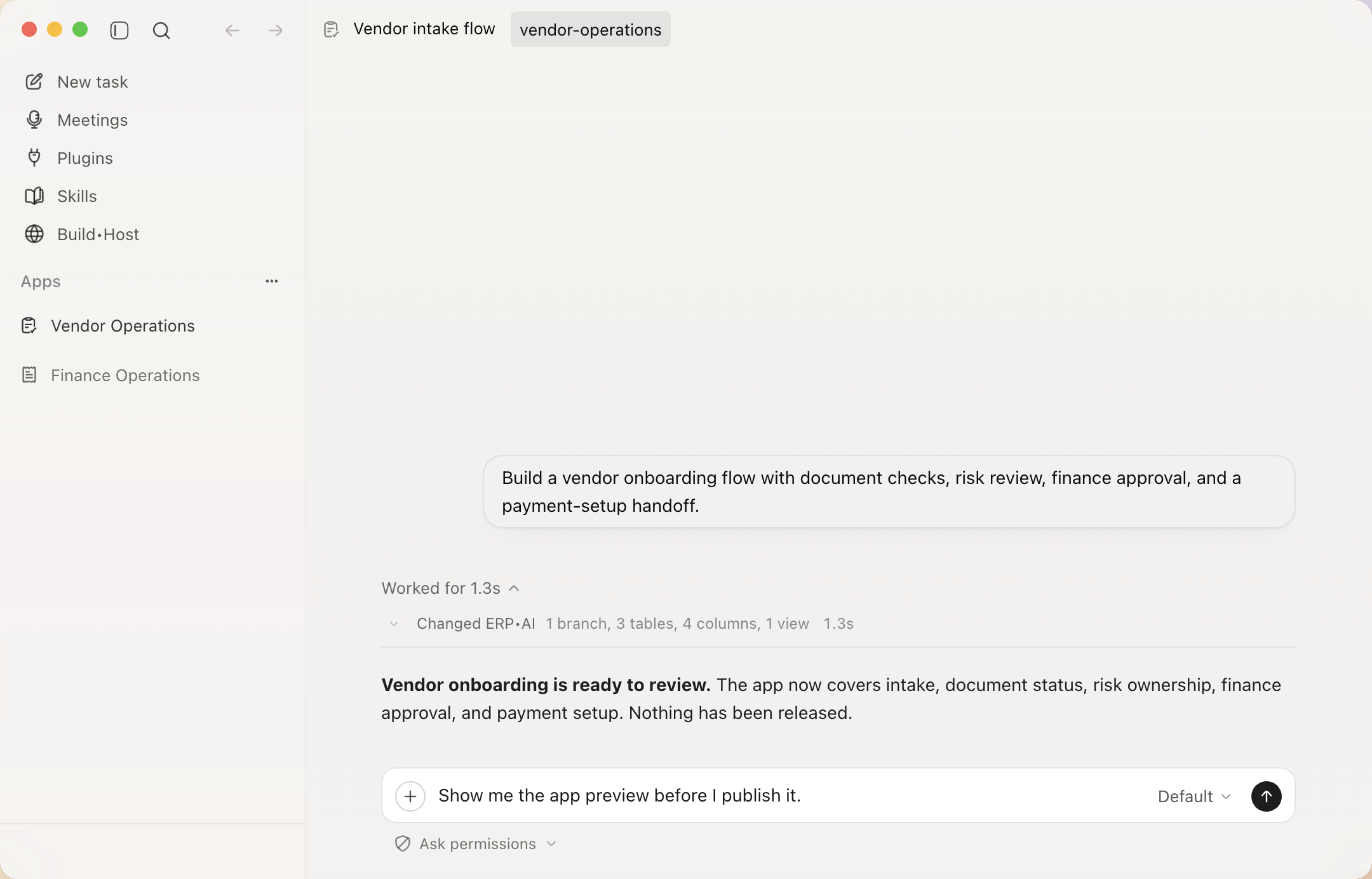
Ask Proto to build a vendor onboarding flow with document checks, risk review, finance approval, and a payment-setup handoff. The conversation can become tables, typed fields, a review queue, a tested workflow, and an app preview.
“Show me the app preview before I publish it.”
Proto makes release restraint visible. A preview is evidence, not a hidden go-live step.
Feature branch
Created before mutationData model
Tables and typed fieldsReview path
Queue and finance handoffVerification
Validated before preview
Start with a business problem. Proto drafts the tool around it.
Aging, disputes, follow-ups, owner review.
tables / dashboard / approval flow
Intake, documents, risk checks, payment setup.
forms / roles / onboarding workflow
Requests, coverage rules, manager decisions.
request form / coverage view / approval route
Accounts, risks, next steps, QBR prep.
pipeline view / tasks / report dashboard
Priority, SLA, escalation, article draft.
ticket table / SLA rules / escalation workflow
Coding agents are optimized for repositories and code changes. Proto is optimized for the internal tool itself: records, views, workflows, roles, reports, and approvals.
| Tool | What you describe | Proto builds | You review |
|---|---|---|---|
| Vendor portal | Partners submit documents, ops reviews risk, finance approves payment setup. | Vendor table, intake form, review page, approval workflow. | Publish portal |
| Invoice tracker | Track invoice exceptions by owner, risk, amount, and next action. | Invoice table, aging dashboard, dispute workflow. | Apply tracker |
| Leave flow | Employees request leave, managers approve, HR sees coverage risk. | Request form, coverage view, approval route. | Turn on flow |
| Renewal dashboard | Show renewals, risk reasons, owner tasks, and QBR prep in one place. | Account views, task workflow, report dashboard. | Share with team |
| Ticket queue | Sort support tickets by SLA, customer impact, escalation path, and article need. | Ticket table, SLA rules, escalation workflow. | Launch queue |
| Close checklist | Track close tasks, blockers, approvals, and responsible owners. | Checklist app, owner views, approval log. | Use for close |
Finance
A dashboard for overdue invoices, disputed lines, owners, and approvals.
See examplesOps
Forms, document checks, reviewer roles, and payment setup handoffs.
See flowSales
Account health, owner tasks, QBR prep, and renewal risk views.
See examplesSupport
Priority rules, SLA views, escalation flow, and article drafts.
See examplesProto distinguishes planning from mutation. Sensitive actions can pause for review, dangerous patterns are forced into stricter handling, and the session keeps a recoverable record of approvals, changes, and errors.
Use plan mode to keep write actions out of the agent’s available action set.
Sensitive work can pause with a plain-language explanation of what will change.
Review the locally recorded session for approvals, mutations, and failures.
Proto does not promise universal automatic undo. It shows whether an action is undoable before approval when that information is available.
Create ERP•AI-backed apps, workflows, pages, reports, documents, slides, visuals, and sites.
Work through native ERP•AI actions, plugins, files, browser sessions, and supported desktop apps.
Review plans, answer questions, approve sensitive actions, and inspect the session record.
Install readable skills, preserve context and memory, resume sessions, and delegate focused work.
Proto discovers the available action, works inside the visible surface, and brings the result back into one reviewable task.
name: vendor-onboarding
whenToUse: new vendor intake

1. Collect required documents
2. Check risk and ownership
3. Prepare finance review
4. Request approval before setupProto can install and use readable skills, preserve task context, resume the same session, and delegate focused work to agents without hiding the process from the operator.
Start with a process your team already owns. Proto turns the request, systems, decision point, and output into one operating trace.
Investigate invoice exceptions, update records after approval, and produce a review pack.
Move vendor intake through document checks, risk review, finance approval, and setup.
Coordinate onboarding, access and tasks, policy answers, and document workflows.
Research account context, update the CRM, draft responses, and escalate with evidence.
Workspace state, session history, context, and local memory live on your machine by default. Selected models and configured services receive the data required to perform the work you ask for.
Proto is an alpha desktop product. These answers describe the current release, not future roadmap concepts.
Proto is the desktop agent console built by ERP•AI. It lets people describe work in plain language, follow the agent’s progress, approve sensitive actions, and keep a durable session record.
Yes. Proto works as a general agent runtime, with deeper native capabilities when connected to ERP•AI apps, records, workflows, and teams.
The desktop runtime, workspace state, sessions, context, and local memory live on your machine by default. Model requests, configured plugins, and optional connected features exchange the data needed to perform their work.
No. Sensitive actions can require approval. Read-only and policy-allowed actions may proceed automatically, while dangerous patterns receive stricter handling.
No. Proto shows whether an action is undoable before approval when that information is available, but it does not promise universal automatic undo across external systems.
You can choose from supported cloud models or connect a compatible local model server. Capabilities and action support can vary by provider and model.
The current alpha release provides packaged downloads for macOS Apple Silicon, Windows x64, and Linux x64.
No. Proto is proprietary software. Copyright © 2026 ERP•AI. All rights reserved.
Your workspace and session history stay on your machine by default.
v0.2.74 • Released 24 August 2026
APIs and on-disk formats may change during alpha. View release notes
 Proto
Proto